
Adding a Loan Transaction
A transaction in the Lendiom system represents any time there's an exchange of money. For example, a down payment is paid or a regular payment is made.
New Transaction Screen
Below is a screenshot of the screen where you enter in the details of a new transaction.
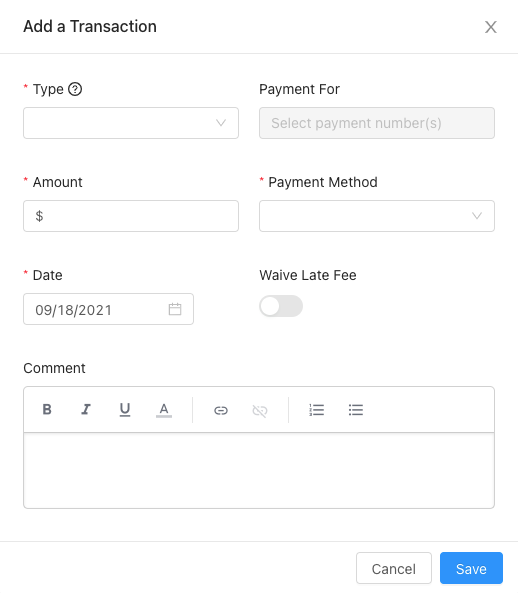
Input Descriptions
Generally, once a transaction is created none of the values can be changed. However, there are three exceptions:
- You can change the Status of the transaction.
- You can reverse a transaction (this acts like an undo).
- You can change the date, but this only changes the displayed date and doesn't affect the loan's amortization.
Transaction Type
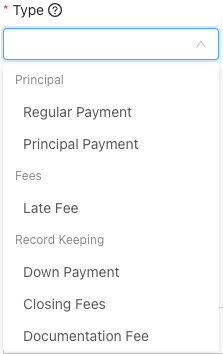
The transaction type determines how the money is applied against the loan. For a visual reference, see the dropdown below:
Payment For
When the transaction type is Regular Payment, this input is enabled. One or more payments can be selected. Payments that have been paid in full won't appear. Payments with an asterisk (*) are late.
Note: This section is still being developed. If you've questions, please contact our support team.
Amount
The amount of money in the transaction. Whenever any number of payments are selected, this input will be populated with the sum total of the payments.
Payment Method
The way in which the money was exchanged. The current options are:
- Banking
- Credit/Debit Card
- Cash
- Check
- Bank Transfer (ACH)
- Wire
- Money Order
- Cashier's Check
- Zelle
- Apps
- Cash App
- PayPal
- Venmo
- Other
- Barter (exchange of service for payment, etc.)
- Other
Date
When the transaction happened.
Note: Transactions must be applied in sequential order (oldest to newest).
Waive Late Fee
If the date of the transaction is after the due date of a selected payment, this input will be enabled. Waiving the late fee will reverse a late fee that has been applied automatically.
Status
Whenever the transaction type is Regular Payment, a Status input will show up. You can set a transaction as any of the following:
- Pending
- Success
- Failure
- Reversed
Tip: One use case of the Status field is whenever someone makes a payment that will take a few days for the money to clear. For example, if a buyer sends you a check or money order, create the transaction with the date the money was received and then change the status when it clears.
Extra Application
This field is the same as the Extra Payment Application field in the Loan Creation screen. It determines how extra payments are applied to the loan. It pulls the default value from the loan but can be changed for a specific transaction.
Transaction Payment Distribution
Whenever a payment is applied, a certain sequence is followed to ensure the funds are correctly distributed and calculated. The distribution of the funds depends on the transaction type selected when the transaction was created.
Regular Payment
The distribution of a regular payment depends on how the loan is configured. When you created a loan, you selected the extra payment application, which determines how extra funds are allocated. Additionally, if the loan has any late fees and you configured the late fee tiers to be paid first, then the late fee will be paid first. Then any escrow that's configured on the loan will be paid. If the interest schedule is set to "Accrues Daily" and there's accrued but unpaid interest balance, then the interest will be paid first. Finally, the interest and then the principal will be paid.
Principal Payment
A principal payment transaction type means that 100% of the amount goes towards the principal. Don't use this type for recording a payoff; instead use the record payoff feature.
Late Fee
The transaction type of late fee allows you to manually apply a late fee tier or manually record a late fee payment. A positive value pays the late fee balance. A negative value adds to the late fee balance. When recording a late fee transaction, you must select the late fee tier that's being paid or applied.
Down Payment
This type of transaction is only for record keeping. It does nothing to the amount of principal due. If you're collecting down payments online, please see the Loan Down Payments documentation.
Earnest Money
For your record keeping only.
Closing Fees
For record keeping only.
Documentation Fee
For your record keeping.
Adjustment
This transaction type is for reconciling the loan balance. It's used when the loan balance is incorrect and needs to be adjusted. One instance where this might be used is if a client paid a few cents too little on a payment and you want to void the remaining cents.
Not Recommended: While you can use an adjustment transaction to correct a loan balance, we don't recommend doing so regularly. If you find yourself using this type of transaction frequently, please contact our support team so we can understand the issue and improve our system.
When you use an adjustment transaction, you must provide a reason for the adjustment. The value of the adjustment can only be negative, as this type of transaction is used to subtract from the loan balance. If you select a specific payment to adjust, the adjustment will only affect that payment and not any others. However, if you don't select a payment to adjust, the system will only update the principal balance and the amortization schedule without affecting any interest. This transaction type is automatically used when recording a loan payoff if there are adjustments or credits required.