
Refinancing a Loan
Since version 0.56.0, Lendiom can refinance a loan. A refinance takes everything a borrower currently owes you, rolls it into a single new loan with new terms, and freezes the old loan permanently. It isn't an edit. Lendiom creates a second loan record, links the two together, and puts the original into a read-only Refinanced status it can never leave.
Reach for it when the terms themselves need to change: the borrower fell behind and you agreed to re-paper the deal, the rate is moving, the cadence is moving, or an interest-only loan needs to start amortizing.
A refinance can't be undone. There's no revert, no unwind, and no way to move the original loan back out of Refinanced. Run the preview, read every number, then commit.
Before you start
You need Update permission on Loans. Without it the Actions button on the loan page is disabled entirely.
The loan also has to be in a status Lendiom will accept. Refinance is available from five:
| Status | Can refinance? |
|---|---|
| Current | Yes |
| Grace Period | Yes |
| Late | Yes |
| In Default | Yes |
| Defaulted | Yes |
| Draft, Pending | No, the menu item is disabled and tells you why |
| Pending Payoff, Paid Off, Repossessed, Inactive, Canceled, Refinanced | No, nearly every action on the loan is disabled |
The loan must also already have a payment schedule, and it must have at least one payment still unpaid. A partially paid installment counts as unpaid, so a loan whose final payment is short by a dollar can still be refinanced.
See Loan Status for what each status means on its own.
Opening the refinance window
From the loan page, open Actions and pick Refinance Loan.
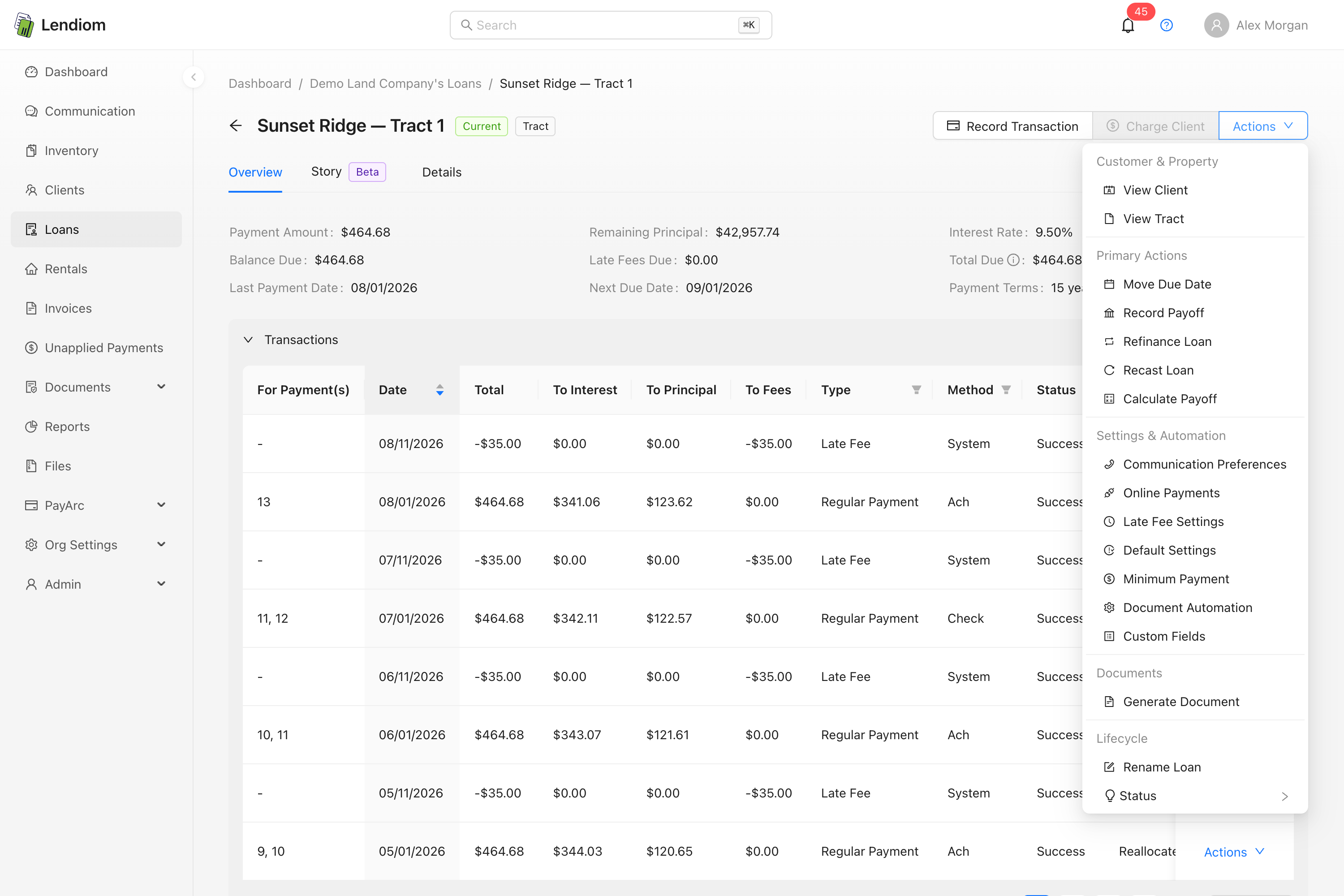
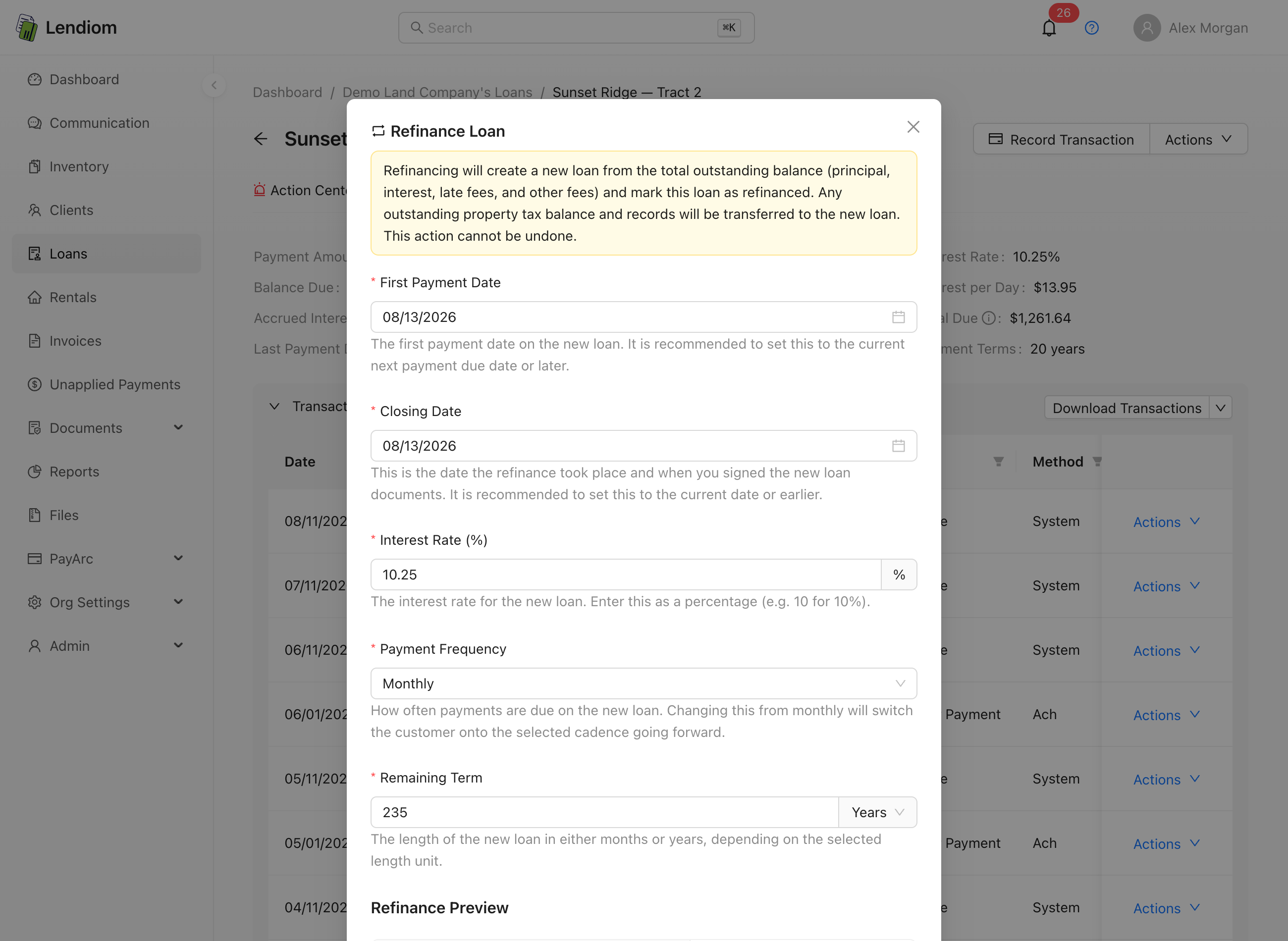
The window opens with a warning banner across the top and a live preview underneath that recalculates as you type. Nothing is saved until you press Refinance and confirm.
What gets rolled into the new loan
The new loan's amount is the borrower's total outstanding balance. Lendiom adds these together:
| Balance | Rolled in? |
|---|---|
| Principal | Yes |
| Unpaid interest carried from prior periods | Yes |
| Interest accrued since the last payment | Yes |
| Late fees | Yes |
| Flex late fees | Yes |
| Other fees | Yes |
| Property tax | No, transferred separately |
The sum of those first six becomes the new loan's sales price, loan amount, and starting principal balance in one shot. The preview labels it New Loan Amount.
Property tax is the exception. It's moved across as the new loan's property tax balance rather than folded into principal, and any unpaid property tax records attached to the original loan are reassigned to the new one. It keeps its own line in the preview, labeled Property Tax (transferred).
Late fees become principal, and principal earns interest
Once a late fee is rolled into the new loan it stops being a fee. It's principal now, and it accrues interest for the rest of the term along with everything else. The same is true of the unpaid interest you capitalize.
Check the Late Fees line in the preview before you commit. If you intended to forgive some of that balance, waive the fees on the original loan first. The moment the refinance lands, waiving on that loan is blocked (error 19536) because its closing balance has already seeded the new loan. See Late Fees.
The fields
First Payment Date is when the first payment on the new loan comes due, and it's also the refinance's effective date. Lendiom blocks any date before the original loan's closing date, its last transaction date, or its last payment received date, whichever is latest.
Closing Date is when the refinance actually happened and the new paperwork was signed. It defaults to the first payment date. Set it to today or earlier.
Interest Rate starts at the current rate. Enter it as a percentage, so 10 means 10%. It can't be negative.
Payment Frequency offers Monthly, Biweekly, and Weekly. If the original loan sits on a cadence Lendiom no longer supports end to end, say a legacy Quarterly loan, the window tells you so and defaults the selector to Monthly. Anything outside those three is rejected with error 2513.
Remaining Term is the length of the new loan, and Lendiom reads it as calendar time: 60 with Months selected means five years of schedule, whatever the cadence.
The number Lendiom prefills isn't calendar time. It's a count of the payment periods still unpaid on the current schedule. On a monthly loan the two are the same and nothing looks amiss. On a weekly or biweekly loan they aren't. A five-year weekly loan runs 260 periods, so with 20 payments made the field arrives reading 240 . The unit selector beside it's filled in separately, from whatever unit the original loan's term used, and it doesn't follow that number: on that same loan it still says Years. The field is offering you a 240-year note.
Reconcile both halves before you save. Work out the calendar length those remaining periods actually represent. 240 weekly payments is roughly 55 months. Enter it, and confirm it in the preview: New Term should read what you intended, and on a weekly or biweekly refinance the Number of Payments count should land near what the borrower really has left. The term drives the payment, the total interest, and the last payment date, and none of it can be corrected afterward.
On an interest-only loan the field is prefilled differently: it holds the original loan's full contractual term, not the remaining periods.
If the first payment date plus your shortest late fee grace period already falls in the past, the window shows a red warning: the new loan will take a late fee the moment it exists. Move the first payment date forward.
Reading the preview
The preview is a real dry run against the server, not a client-side estimate, and it re-runs about half a second after each change. It shows the balances being rolled in, the New Loan Amount, Current Payment and New Payment, Current Rate and New Rate, the new term, total interest, total payments, and the new schedule's Next Payment Date (its first payment) and Last Payment Date. Payment and rate are always two rows apiece, shown even when the rate hasn't moved; a Frequency Change or Schedule Change row appears only when you actually change the cadence or the interest schedule. On a weekly or biweekly refinance you also get a Number of Payments count, because a 60-month term at weekly cadence is roughly 260 payments.
Interest-only loans
An interest-only loan can't be refinanced back into another interest-only loan. The window adds a required New Interest Schedule field and makes you pick one of two amortized schedules:
| New schedule | What it means |
|---|---|
| Follows Payments | Interest is calculated per payment period |
| Accrues Daily | Interest accrues every day. See Interest Accrues Daily |
Three rules the server enforces. You can only change the schedule when the original loan is interest-only (error 2510). The only valid targets are those two (error 2511). And you must supply a term length when converting (error 2512), which is why the field arrives pre-filled for interest-only loans instead of blank.
What carries over and what does not
The new loan inherits the original's borrower, property or tracts, loan type, and configuration:
| Setting | Carries over? |
|---|---|
| Client and associated tracts / residential property | Yes |
| Communication preferences and automated messaging | Yes |
| Late fee tiers and configuration | Yes |
| Defaulting configuration | Yes |
| Online payment configuration | Yes |
| Document automation configuration | Yes |
| Escrow configuration, including its balance and application step | Yes |
| Extra payment application | Yes |
| Interest formula | Yes, unless you convert to Follows Payments, which clears it |
| Auto-draft | No, disabled on both loans |
| Down payment | No, the new loan's down payment is zero |
| Setup fees | No |
| Minimum payment configuration | No |
| Custom field values | No |
| Transaction history, notes, and schedule | No, the new loan starts a fresh ledger |
Auto-draft dies on both loans
Refinancing switches auto-draft off on the original loan and creates the new loan with auto-draft off. Lendiom doesn't migrate the stored payment method or the draft amount, because the payment amount has changed and the old figure would be wrong.
Nobody is told automatically. If the borrower was on auto-draft, the next scheduled draft simply doesn't happen. Re-enroll them on the new loan and tell them the amount changed.
Escrow deserves one note: the configuration and the current balance copy across, but the escrow ledger entries stay on the original loan. See Loan Escrow.
Committing
Press Refinance. Lendiom shows a confirmation listing the changes it's about to apply, including rate, cadence, and schedule shifts, and repeats that the action can't be undone. Confirm, and Lendiom creates the new loan, links it, freezes the original, writes a system note on each loan describing the change, and redirects you to the new loan.
The new loan is named after the original with (Refinanced) appended, and it starts in Current status.
Payment numbering continues
The new loan's schedule doesn't restart at payment 1. Lendiom carries the count of fully paid installments from the original loan forward, so a loan with 24 paid payments produces a new schedule whose first row is payment 25. Refinancing a second time keeps accumulating, so a loan refinanced twice still numbers straight through.
What happens to the original loan
The original takes the Refinanced status and stays there. It's a permanent, terminal state. There's no path back to Current.
Everything that touches money on that loan is now closed:
| Action | Result |
|---|---|
| Add or reverse a transaction | Blocked in the interface |
| Waive a late fee | Blocked (error 19536) |
| Recast the loan | Blocked (error 2605) |
| Refinance it again | Blocked (error 2500) |
| Change status, due date, late fee config, or anything else in Actions | Blocked, the menu still opens but the items are greyed out and carry a tooltip saying why |
| Edit custom field values | Allowed, Custom Fields is left enabled regardless of status |
| Take an online payment or start auto-draft | Blocked (error 9993) |
The record itself stays fully readable. Its transactions, schedule, notes, and documents are all still there, and the Overview tab gains a Refinanced Date and a Refinanced To link to the new loan. The new loan carries the mirror link, Refinanced From.
Refinanced loans are treated as inactive: they drop out of the default loan list unless you include inactive loans, and they stop counting toward your organization's active loan count for billing.
What the borrower sees
The old loan doesn't disappear from Lendiom Pay. It stays visible in the borrower's list so they keep access to their own payment history.
It's excluded from their totals, though. The refinanced loan contributes nothing to their balance due, and it's ignored when Lendiom works out their next due date and last payment date. Those figures come from the new loan. The borrower also can't pay the old loan online. Every payment path checks the status first.
Error reference
| Code | Meaning |
|---|---|
| 2500 | The loan's status doesn't allow refinancing |
| 2501 | The loan has no schedule, or has no remaining unpaid payments |
| 2502 | No effective date was supplied, or the new term length isn't greater than zero |
| 2503 | The effective date is before the loan's closing date |
| 2504 | The effective date is before the loan's last transaction date |
| 2505 | The interest rate is negative |
| 2506 | The term length unit is neither months nor years |
| 2510 | The interest schedule can only be changed on an interest-only loan |
| 2511 | Interest-only loans can only convert to follows-payments or accrues-daily |
| 2512 | A term length is required when converting away from interest-only |
| 2513 | The payment frequency must be monthly, biweekly, or weekly |
| 2605 | A refinanced loan can't be recast |
| 9993 | Online payments and auto-draft aren't allowed on a refinanced loan |
| 19536 | Late fees on a refinanced loan can no longer be waived |
Refinance or recast?
If the terms are staying the same and you only need to re-spread the remaining balance over the remaining schedule, use Recast Loan instead. Recast works in place: one loan, history intact, no new record. Refinance is for when you're genuinely writing a new note. Recast is also unavailable on interest-only loans, which is part of why converting one requires a refinance.