
Understanding the Amortization Schedule
Every loan Lendiom creates gets an amortization schedule: one row per scheduled payment, from the first payment date through payoff. It isn't a static document produced once at closing. It's regenerated from the loan's terms and its recorded transactions, so the rows behind the borrower's last payment are history and the rows ahead of it are a projection.
Where You See It
Open a loan and expand the Amortization Schedule panel. The same table previews the schedule before you save in the last step of creating a loan, and previews what a buyer would owe on a tract's payment option.
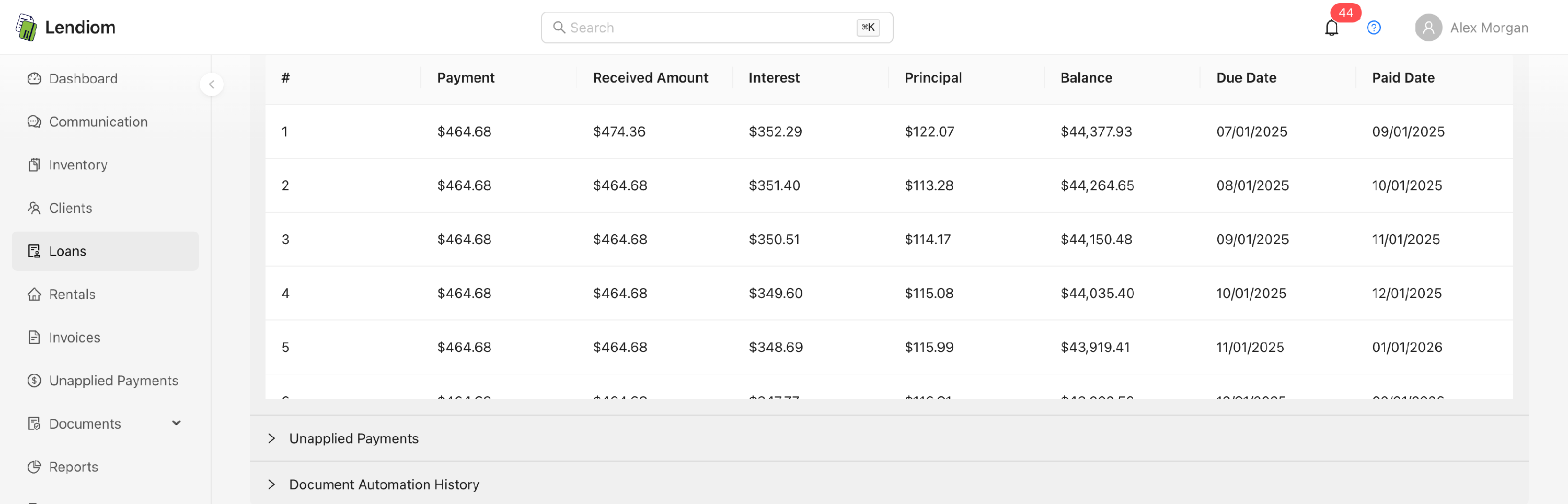
The table scrolls inside a fixed-height area rather than paging, and every payment is loaded. Download Schedule builds a printable version and opens it in a new browser tab; it's hidden on phones and disabled when your organization's billing status isn't active, trialing, or incomplete.
How the Schedule Is Generated
Which generator runs depends on the loan's Interest Schedule:
| Interest schedule | How each row is built |
|---|---|
| Follows Payments | The classic amortization formula. The row count comes from the term, which is years times payments per year, with a term in months rounded up so the last partial period still gets a payment. It never exceeds that. A row's interest is the balance times the annual rate divided by the payments per year. |
| Accrues Daily | The generator walks forward one due date at a time until the balance reaches zero. A row's interest is the balance times the daily rate times the days between the previous due date and this one, so amounts vary with the length of the month. |
| Interest Only | Each row's payment is the interest for that period; principal doesn't move. A fixed or balloon term produces a full set of rows; an indefinite term shows only the next twelve payments and grows as payments are recorded. |
Monthly, biweekly, and weekly payment frequencies are supported, and row spacing follows whichever one the loan uses. If the loan has escrow, the escrow amount is added on top of each row's payment and broken out in its own column.
The Accrues Daily table opens with an Interest Accruing Daily notice, and it means what it says: the projection assumes each payment lands exactly on its due date. Pay late and the real interest is higher than the row shows. The same applies to interest-only loans.
Because an Accrues Daily schedule runs until the balance is gone rather than for a set number of rows, Lendiom caps how many rows it will generate. When the term is written in years, the cap is that term plus another ten years of payments, scaled to the payment frequency. When the term is written in months, the generator treats it as 360 months no matter what you entered, so the cap is always forty years of payments. A 36-month accrues-daily loan stops at 480 monthly rows, not the 156 the term plus ten years would suggest. Either cap gains a further ten years of payments when the loan's last recorded payment date has run past the projected end of the term. A loan whose payment is too small to retire the balance hits the cap instead of generating rows forever. See The Final Payment.
The Columns
| Column | What it holds |
|---|---|
| # | The payment number. See Payment Numbering. |
| Payment | The amount owed for that period, escrow included. |
| Received Amount | Total applied to that payment. Only on the loan page. Hover to see how many transactions touched the row. |
| Unpaid Interest | Interest carried over from earlier periods that this payment retired. Only on Accrues Daily and Interest Only loans, and only on the loan page. |
| Interest | The interest portion of the scheduled payment. |
| Escrow | The escrow portion, shown when the loan has escrow and you have permission to see it. |
| Principal | The principal portion, plus any extra principal and any principal-only money attached to the row. |
| Balance | Remaining principal after the row. |
| Due Date | When the payment is due. |
| Paid Date | The date of the transaction that last paid against the row. |
Escrow doesn't always sit in the same place. The order above is what you get on an Accrues Daily or Interest Only loan page, the only tables that carry the Unpaid Interest column, where Escrow lands between Interest and Principal. Everywhere else it lands between Principal and Balance: on a Follows Payments loan page, and in the creation wizard's preview, which has no Received Amount column.
Hovering the Interest, Unpaid Interest, Escrow, and Balance cells shows the value at full stored precision, fourteen decimal places. The Unpaid Interest column is never filled in by the generator; it's written when a real payment covers carried-over interest, so a projected row always shows zero there.
Payment Numbering
The # column is a running count that starts at 1 and never restarts partway through a loan. Three cases move the starting point: a refinanced loan continues from where the original loan's paid payments left off rather than resetting to 1, a recast continues from the last preserved paid installment, and a pre-existing loan on the Follows Payments schedule continues from the last paid-in-full payment number you entered.
Transactions attach to rows by an internal index rather than by the number you see, so these offsets never break the link between a payment and its transactions.
Partial Payments, Principal-Only, and Adjustments
Once a row is fully or partially paid it's frozen: the generator reuses the interest and principal stored on it and carries the resulting balance forward instead of recomputing the period. Everything after the last touched row is regenerated from that balance.
- Partial payment. Received Amount accumulates as money arrives. The row stays partially paid until the received total reaches the payment amount, then flips to fully paid.
- Principal-only payment. It attaches to the first row that isn't fully paid, marks it partially paid, and adds to the Principal cell. The regular payment for that row is still owed in full.
- Payment adjustment. An adjustment transaction credits the rows you select: Received Amount goes up and the row can flip to paid, even though no cash arrived. The credited amount is stored on the row so later regenerations reproduce the same balance.
- Moved due date. Balances you roll to the end of the loan are recorded on the affected row as an adjustment too, which is why that row's balance can rise rather than fall.
Row Flags
| Flag | How it looks |
|---|---|
| Late | The row's text turns red and the due date gains a trailing asterisk with the tooltip Payment is late. Set once the due date plus the late fee grace period has passed and the payment isn't paid in full. |
| Not paid in full | The Paid Date gains a trailing asterisk with the tooltip Not paid in full. |
| Principal-only | The Principal cell gains a tooltip counting the principal-only payments attached to the row. |
A moved due date is recorded on the row. Both the original date and the moment it changed are stored, but the schedule table surfaces none of it. The row shows only the new date. To confirm whether a date was moved, read the system note the move wrote to the loan's Notes card.
Overwriting the Payment Amount
In the How Much step of loan creation, the payment field is read-only until you press Calculate. Once a calculation exists, Overwrite unlocks the field so you can type your own amount, which replaces the computed payment everywhere the schedule is generated.
Lendiom pushes back before you continue. Zero or negative is rejected outright, and an amount below the calculated payment raises a confirmation warning. On an amortized loan it warns the result could be an infinite loan, and on an interest-only loan it warns the shortfall accrues as unpaid interest each period. Downstream:
| Interest schedule | Effect of a payment lower than calculated |
|---|---|
| Follows Payments | The row count never exceeds the term, so the final row still shows a leftover balance. |
| Accrues Daily | Rows keep generating until the cap, and the leftover folds into the final payment. |
| Interest Only | The shortfall stays as interest; an overwrite above the interest due sends the excess to principal. |
Escrow is added on top of the overwritten figure, not absorbed by it.
The overwritten payment is a loan term set at creation. It isn't editable from the schedule table or the loan's edit screens. To change the payment on a live loan, recast it.
The Final Payment
The last row is rarely the same amount as the rest. Smaller is the normal case: when the remaining balance plus that period's interest is less than the regular payment, the final payment is exactly that sum, enough to close the loan and nothing more. Anything under a cent stops the schedule rather than generating a row.
Larger happens when the schedule hits its cap. Everything left over folds into that last row and produces a balloon: the remaining principal, plus any interest earlier payments could not cover. Interest-only loans with a balloon term get their balloon row appended the same way.
When the Schedule Regenerates
Regeneration is automatic, and runs whenever the loan is touched in a way that could change the math:
| Trigger | Examples |
|---|---|
| Transactions | Recording, updating, reversing, or deleting one; waiving late fees |
| Loan changes | Creation, updates, escrow activity, moving a due date, refinance, recast |
| Bulk work | Committing a data import |
| Nightly | The Loan Data Integrity job, which runs at 00:30 America/Chicago and also applies late fees and refreshes the next due date |
Paid rows survive regeneration; the unpaid tail is what gets rebuilt. The on-screen table refreshes when the loan's modified timestamp advances, so if the rows look stale after an action, reload the page.
Revising a transaction's date changes the transaction only. It doesn't rebuild the schedule, recalculate interest paid, or recalculate late fees due. To correct the schedule, reverse the transaction and record it again.